
JAMB Regularisation for NYSC: Full Step-by-Step Guide
Complete details of the simplest guide to JAMB regularisation for NYSC registration can be found here on Ejes Gist News.
Candidates who are enrolled in one institution but hold no JAMB registration number are free to apply for the JAMB Late Application, the service previously called regularisation.
JAMB charges N10,000 for late applications. The task is completed by following the steps set out below.
For more on this, see the guide to building a JAMB online profile.
How the JAMB regularisation procedure runs
- Anyone who is a new user has to open a profile on the Sign Up (New User) page.
- Those who already have accounts simply type in their login credentials. Creating a profile requires a valid email address, surname, first name, phone number, state and local government area of origin, and a password, after which the Sign Up button is pressed. An applicant may hold only one profile.
- Next, sign in with the email address and password.
- Signing in takes you to the landing page, where every available service is listed.
- Pick “Late (Retroactive) Application” from the drop-down menu on the sidebar.
- A “Late Application” entry shows up once that choice is made. Click it.
- Choosing the service generates a Transaction ID, which appears on the confirmation tab.
- Check the information on the Confirmation Page and take note of the Transaction ID, which is printed in bold red. That ID will be required for any later reference to the transaction, and a copy is sent to the email address you registered.
Carrying out JAMB regularisation ahead of NYSC registration
- To pay by card at once, click Continue. Where another channel is preferred — an ATM, cash at a bank or Quickteller — note the transaction ID, because it will be needed.
-
Fill in your card details on the Interswitch payment page and click the Pay button.
- Your payment status is displayed in the “My Payment Section”. Once payment goes through, an SMS and an email carrying your unique transaction identification and payment status are sent. Press the Enter key to continue.
- After payment, you are asked to supply two things: the year of examination and the JAMB registration number.
- When the details have been entered correctly, the application form appears. It has to be completed online, and some of its fields are mandatory.
- Click Submit to finish the submission.
- An Indemnity Form is then displayed for printing.
- Complete the form and hand it to your school for approval.
- Forwarding the approved form to the JAMB state office is the responsibility of your institution.
- The approved form is attached to your profile once it arrives, and you are notified when that has been done.
- JAMB will then process the application, and your details are updated as requested.
JAMB regularisation, validation and late application: the process in screenshots (DE and NYSC)
Doing JAMB regularisation for NYSC registration, with pictures
1. →Click here to create an account and supply every piece of information requested. Be careful with your phone number and email address, and click sign up once the account is created.

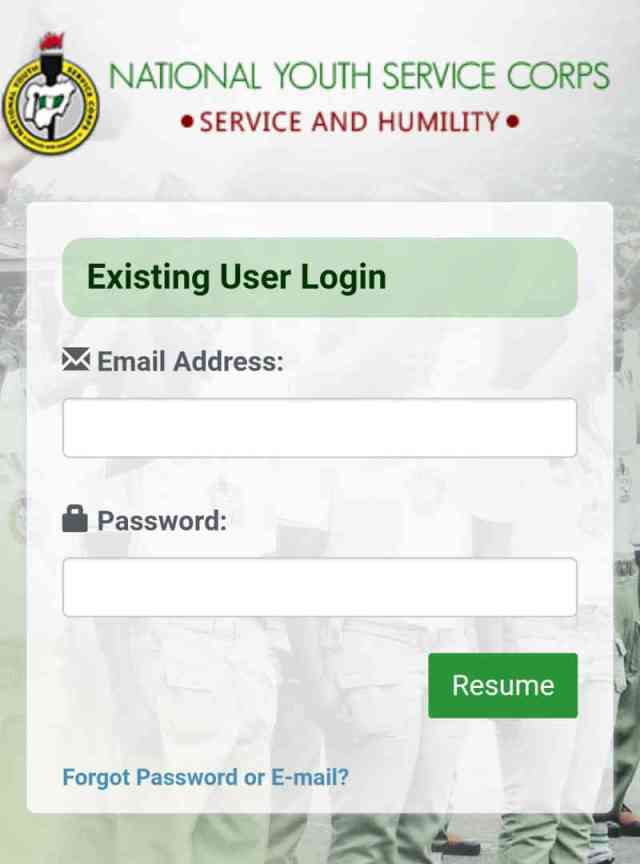
2. →With the details you registered, you can now sign in on the login page.

3. →The dashboard presents several e-facility options; click on Regularize Admission/Late Application.

4. →The payment confirmation page opens, offering two payment choices: online or bank payment.

5. →Go over the details on the confirmation page and note the Transaction ID shown in bold red. That ID is required for every future reference to the transaction, and a copy goes to the email address you registered.
Continuing the JAMB regularisation steps
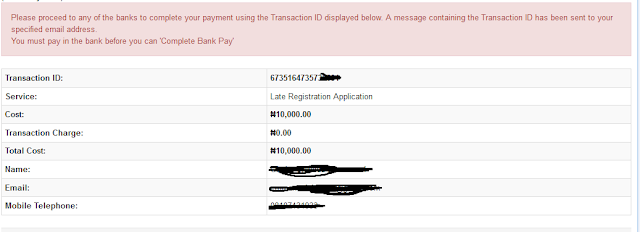
6. →Click Continue if you want to pay by card straight away. Should you prefer other channels, such as ATMs, cash at a bank or Quickteller, keep the transaction ID handy, since it will be requested.
7. On the Inter-switch payment page, fill in your card details and hit the Pay button.
8. →The state of your payment is shown in the “My Payment Section”. After payment, an SMS and an email containing your unique transaction identification and payment status are sent to you. Click Continue.
9. →Once payment is done, enter (a) your year of examination and (b) your JAMB registration number.
10. →When the information is entered correctly, the application form comes up. Complete it online and pay attention to the mandatory fields.

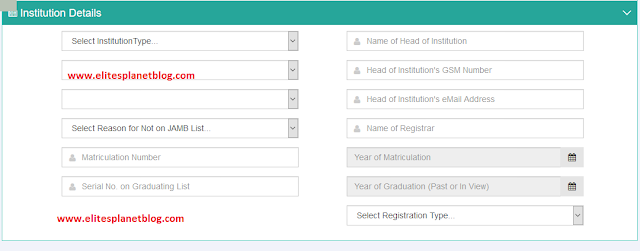


11. →Click Submit and the application is complete.
12. →Print out the indemnity form that is displayed.
13. →Fill in the form and take it to your institution for approval.
14. →Submission of the approved form to the Joint Admissions and Matriculation Board state office rests with your institution.
15. →The approved form is uploaded to your profile, and a notification reaches you once that is done.
16. →JAMB now processes the application. Where it is approved, your details are changed as requested.
NOTE1. An Indemnity form is not accepted unless the Head of Institution has earlier given his or her signature in person to the Joint Admissions and Matriculation Board Registrar.
2. Where the candidate has not yet been offered admission, the form should be taken to the State JAMB office for the endorsement of the Zonal/Coordinator.
3. Every candidate with regularisation issues should confirm that the indemnity form has been sent to the nearest JAMB office.
4. The process costs the sum of Ten [10] Thousand Naira Only (N10,000).
Frequently asked questions
What does JAMB regularisation cost?
Answer: The official price is put at N5,000. Bear in mind as well that a CBT centre or an internet café will charge for its services.
What steps do I follow to check my JAMB regularisation status?
Answer: Open the official JAMB portal, www.jamb.gov.ng.
- Choose “Students” from the header menu.
- Select “check matriculation list”.
- In the first box, pick the year in which you sat the JAMB examination.
- Type your JAMB registration number into the second box.
- Click the button marked “fetch my details”.
What is the turnaround time for JAMB regularisation?
24 hours
According to the matriculation board, approval is normally completed within 24 hours of the stamped indemnity forms being collected from the schools.
Is regularisation mandatory?
Every graduate must be cleared by the Joint Admission and Matriculation Board (JAMB) in order to qualify for mobilisation by the NYSC.
JAMB regularisation for NYSC registration: the full guide
Regularisation, validation and late application: more questions and answers
Q: Who needs to regularise or validate?
A: A candidate who gained admission without a JAMB registration number, or whose mode of admission does not require one.
For 2020/2021 Direct Entry/UTME online registration, this covers a candidate whose JAMB registration number is not showing ADMISSION OFFERED when checked online on the JAMB website.
Q: I already hold a JAMB registration number; can it be regularised?
A: Any Joint Admissions and Matriculation Board registration number that returns a result when checked online cannot be regularised, and neither can a number obtained through the normal online processing of JAMB, UTME or a polytechnic for which you later sat an examination.
Q: Which type of JAMB registration number is eligible for regularisation?
A: The JAMB registration number issued to you by the school from which you graduated.
Q: I keep trying to register for the new JAMB regularisation and find it difficult; has any candidate been registered successfully?
Answer: Yes.
Q: Can the JAMB regularisation be done online with a phone?
Answer: On the strength of the writer’s knowledge, processing the form on a phone is not advisable; a desktop computer with internet access gives a better view of the form.
More on JAMB regularisation for NYSC registration
Note: No mistake can be corrected, because the stages of the exercise leave no room to preview entries before final submission. Clicking submit is the final submission.
Q: How is the payment made?
Answer: Payment is made online with an ATM card.
Q: Is a thumbprint required during the exercise?
Answer: No, a thumbprint is not required.
Q: Can the registration be carried out by proxy, in the person’s absence?
Answer: Yes, at present, provided the person concerned gives you his or her correct information and passport photograph. Remember that whatever information you supply is what appears on the final printout.
Q: I made a mistake during the registration; can it be corrected?
Answer: No. An error noticed after final submission cannot be undone. The only remedy is to create a new profile and make another payment of N8,500.
NOTE: The Official Price for the Joint Admissions and Matriculation Board Regularisation/Late Application is N8,500 Only.
New rules on JAMB regularisation and admission letters for NYSC corps members
Some students still struggle to obtain their JAMB admission letters. To solve the problem, the Joint Admissions and Matriculation Board has directed that all affected students should visit any of its accredited centres for regularisation of their admission.
The procedure to follow depends on the nature of the problem:
1. No admission offered yet
A student in this category should visit an accredited JAMB centre to complete the “Request for Admission Letter” form.
2. Admitted to a different institution
Where the admission status shows another institution, the student should visit an accredited JAMB centre to fill the form for “Change of Admission Letter“.
3. Students without a UTME or Direct Entry registration number
Students in this category need to fill the form for Regularization of Admission. Those with no Joint Admissions and Matriculation Board record should print their Indemnity Form and submit it to the Registrar’s Office for processing.
Students who fail to comply with the directive may be unable to mobilise for NYSC after graduation.
Notice to part-time and sandwich students on regularising admission through CAPS
This is to inform all Part-Time and Sandwich Students in Nigerian Tertiary Institutions (universities, polytechnics, colleges of education and so on) that, in its push for accurate data on undergraduates across Nigerian universities and other tertiary institutions, the Joint Admissions and Matriculation Board has folded the admission process for part-time degree candidates into the Central Admissions Processing System (CAPS).
In light of this, every part-time student enrolled in a Nigerian tertiary institution is directed to visit the JAMB e-facility platform without delay and apply to register documents individually (following the guidelines outlined above and illustrated with images).
All students are asked to carry out the process at any approved JAMB CBT Centre and fill the indemnity form.
After the student completes it, the form is to be endorsed and signed by the Dean, School of Continuing Education (SCE) or Part-Time Studies of the institution, for onward submission to the JAMB Office.
Once the JAMB approves the indemnity forms, students can visit the JAMB website to print their Admission Letter and obtain their respective REG numbers.
Prospective part-time candidates who wish to enrol in any Part-Time/Sandwich programme in a Nigerian tertiary institution MUST first enrol with JAMB by purchasing the JAMB Part-Time/Sandwich/Distance Learning Form at a cost of Three Thousand Five Hundred Naira (N3,500) only before going on to buy the institution’s part-time forms.
Deadline or closing date
There is no deadline or closing date for this process. It is continuous, so candidates or applicants may apply for the service at any time and on any day unless the board rules otherwise.
Source: Ejes Gist News
Today
-
Premier League UPCOMING📍 Hill Dickinson Stadium
-
Premier League UPCOMING📍 The American Express Community Stadium, Falmer
-
Premier League UPCOMING📍 Selhurst Park, London
-
Premier League UPCOMING📍 Craven Cottage, London
-
Premier League UPCOMING📍 Stadium of Light, Sunderland


Stay informed and ahead of the curve! Follow our channel on WhatsApp for real-time updates, breaking news, and exclusive content.
Join Our WhatsApp ChannelEjes Gist News ( EGN) stands for truth, responsible journalism, editorial integrity and fearless accountability.
You May Also Like

Trending Now