
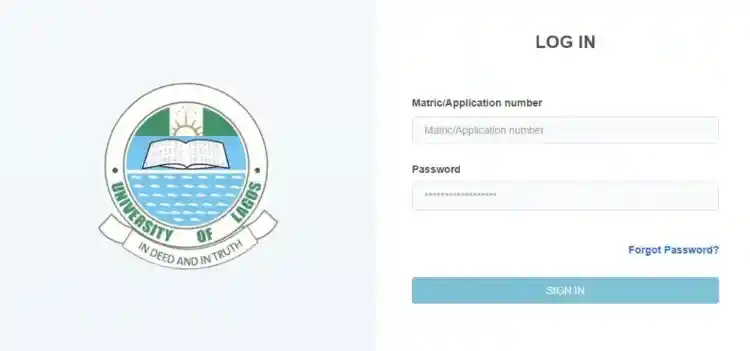
UNILAG Portal Login: Complete Guide to Easy Access to Application and Admission Dashboard
How do I access my Unilag portal login?
The University of Lagos (UNILAG) is one of Nigeria’s premier universities, known for its academic excellence and vibrant student community. If you’re looking to apply or access your student information, the UNILAG Application Portal is your gateway. This comprehensive guide will walk you through everything you need to know about accessing the UNILAG portal, logging in, and making the most of its features.
Why Use the UNILAG Application Portal?
The UNILAG Application Portal is a user-friendly platform designed to streamline the application and admission process for prospective students. Here’s why it’s essential:
- Convenient Online Access: Apply from anywhere without visiting the campus.
- Fast and Efficient Process: Quick access to application forms, admission status, and course registration.
- Secure Login: Ensures the safety of your personal and academic data.
Man with 5.0 CGPA Becomes Overall Best Graduating Student at UNILAG
Features of the UNILAG Application Portal
The portal offers various services for both prospective and current students:
- Online Application Forms: Submit undergraduate, postgraduate, and direct entry applications.
- Admission Status Checker: Monitor the progress of your application.
- Course Registration: Register for courses and check your academic schedule.
- Fees Payment: Pay tuition and other fees directly through the portal.
- Student Profile Management: Update personal information and view academic records.
How to Access the UNILAG Application Portal
To access the portal, follow these simple steps:
- Visit the UNILAG Official Website: Go to www.unilag.edu.ng.
- Navigate to the Application Portal: Click on “Admissions” or go directly to the application portal link (often found on the homepage).
- Choose Your Login Type: Select “Prospective Student” if you are applying or “Returning Student” if you are already enrolled.
UNILAG Portal Login Steps
Here’s how you can log in to the UNILAG portal:
- Visit the Portal: Access the University of Lagos Application Portal at applications.unilag.edu.ng.
- Enter Your Username and Password:
- For Prospective Students: Use the email address and password you registered with.
- For Returning Students: Use your student ID or matriculation number and the password you created.
- Click Login: You’ll be directed to your personalized dashboard.
How to Create a UNILAG Portal Account
If you are a new user, you need to create an account first:
- Click on “Register”: On the login page, select “New User” or “Create Account.”
- Fill in the Required Details: Provide your full name, email address, phone number, and choose a password.
- Verify Your Email: You’ll receive a confirmation email. Click on the link to verify your account.
- Login with Your Credentials: Use your email and password to access the portal.
Troubleshooting Login Issues
Having trouble logging in? Here’s how to resolve common problems:
- Forgot Password? Click on “Forgot Password” and enter your registered email to reset it.
- Incorrect Login Details: Ensure you are using the correct email and password. Check for typos and ensure your Caps Lock key is off.
- Portal Not Loading: If the page isn’t loading, check your internet connection or try accessing it from a different browser.
How to Check Your Admission Status on the UNILAG Portal
To check if you’ve been offered admission:
- Log in to the UNILAG Application Portal at http://studentportal.unilag.edu.ng/
- Select “Admission Status”: Navigate to the admission section of your dashboard.
- Enter Your Application Number: This can be found on your application slip.
- View Your Admission Status: The portal will display whether you have been admitted or if your application is still under review.
Course Registration via the UNILAG Portal
Once you’re admitted, follow these steps to register for your courses:
- Log in to Your Student Account.
- Navigate to “Course Registration”: Click on the course registration link in your dashboard.
- Select Your Courses: Choose the courses you wish to register for according to your department’s guidelines.
- Submit and Print: Click “Submit” and print out your course registration form for future reference.
How to Pay School Fees on the UNILAG Portal
The portal allows secure and easy payment of school fees:
- Log in to the Portal.
- Click on “Fees Payment”: Go to the payment section of your dashboard.
- Choose Your Payment Method: Select from options like bank transfer, debit card, or e-payment services.
- Confirm Payment: Review the payment details and click “Confirm.”
Updating Your Student Profile
Keeping your profile up-to-date is crucial:
- Go to “Profile”: Log in and click on “Profile” or “Student Information.”
- Edit Your Details: Update your contact information, address, and other personal details.
- Save Changes: Click “Save” to ensure your updates are recorded.
FAQs on UNILAG Application Portal
Q: What should I do if I forget my password?
A: Click on “Forgot Password,” enter your email address, and follow the instructions to reset your password.
Q: How can I track my admission status?
A: Log in to the portal and click on “Admission Status” to view updates on your application.
Q: Can I pay my fees through the UNILAG portal?
A: Yes, the portal supports various payment methods for tuition and other fees.
Q: How do I register for courses?
A: Log in to your student account, go to “Course Registration,” select your courses, and submit.
Q: What if the portal is not loading?
A: Check your internet connection, clear your browser cache, or try a different browser.
Q: How can I contact UNILAG support?
A: Visit the “Help” section on the portal or email the support team at [email protected].
Tips for Using the UNILAG Portal Effectively
- Keep Your Login Details Secure: Avoid sharing your password with others.
- Update Your Information Regularly: Ensure your contact details and profile information are accurate.
- Check the Portal Frequently: Stay informed about new updates, announcements, and deadlines.
Conclusion: Maximizing Your UNILAG Portal Experience
The UNILAG Application Portal is a vital tool for both prospective and current students. By following this guide, you can easily navigate the platform, manage your academic tasks, and access important information. Whether you’re applying for admission, checking your status, registering for courses, or paying fees, the portal simplifies the process and saves you time.
- Free Online Courses In Canada For International Students
- How to Apply for FG Student Loan, Portal Opens
- UI Portal Login: Complete Guide to Easy Access to University of Ibadan Application and Admission Dashboard
Start your journey today by visiting the UNILAG portal and take the first step towards a successful academic experience at the University of Lagos.
Ejes Gist News stands for truth, responsible journalism, editorial integrity and fearless accountability.
You May Also Like



Trending Now