

WAEC 2026 Results: How To Generate Your PIN & Serial Number Free
This blog post will answers the following questions:
- How to generate WAEC pin and serial number for free 2026
- WAEC serial-pin portal
- WAEC no more smart card
- How to get my WAEC pin and serial number
What Has Changed with WAEC 2026 Result Checking?
The 2026 West African Senior School Certificate Examination (WASSCE) has been successfully concluded, and candidates across Nigeria and other West African countries are now eagerly awaiting their results. However, this year brings a monumental shift in how students will access their performance reports.
In previous years, WAEC provided candidates with a physical “Result Checker” smart card that contained a unique Serial Number and PIN. Students would simply scratch the card, reveal the credentials, and use them to check their results online. That system has now been scrapped entirely.
For the 2026 examination, WAEC has introduced a new digital-first approach. Candidates will no longer receive any physical card from their schools. Instead, they are required to generate their Serial Number and PIN directly from the WAEC portal using their personal details. This change is part of WAEC’s broader reform agenda, which includes the integration of biometric attendance and the mandatory use of the National Identification Number (NIN) to verify candidate identity. The Head of WAEC Nigeria National Office, Dr. Amos Josiah Dangut, has confirmed that results will be released by August 3, 2026, making it imperative for all candidates to understand this new process before that date.
This comprehensive guide is designed to walk you through every step on how to generate your WAEC Serial Number and PIN for free, checking your results, and troubleshooting common issues. Whether you are using a mobile phone or a computer, this guide will ensure you are fully prepared when the results are finally published.
As reported by Ejes Gist News, this digital transformation is a significant milestone in Nigeria’s educational sector, and candidates must adapt quickly to avoid missing out on their results.
What You Need Before You Start
Before you begin the process of generating your Serial Number and PIN, it is essential to have all the required information at your fingertips. Missing any of these details will prevent you from successfully retrieving your credentials. Here is a checklist of everything you need:
1. Your 10-Digit Candidate Number
This is the unique number assigned to you during your WAEC registration. It is typically printed on your examination timetable, admission slip, or any official correspondence from your school. If you have misplaced this number, contact your school’s examination officer immediately. Do not guess or estimate this number, as even a single digit error will cause the system to reject your request.
2. Your 11-Digit National Identification Number (NIN)
The NIN is now a mandatory requirement for all WAEC candidates. This is issued by the National Identity Management Commission (NIMC). If you have not yet enrolled for your NIN, it is too late for the 2026 examination, and you may face difficulties accessing your results. However, if you already have your NIN, ensure you have the correct 11-digit number written down.
3. Examination Year
This is straightforward—select “2026” from the dropdown menu. Do not select any other year, as this will return an error.
4. Examination Diet
You must select the correct diet for your examination category. If you are a school candidate, select “WASSCE for School Candidates.” If you are a private candidate, select the appropriate diet for your category. Selecting the wrong diet will result in a failed retrieval attempt.
5. A Stable Internet Connection
Since the entire process is online, you will need a reliable internet connection. A poor connection may cause the page to time out or fail to load properly. Using a 4G network or a strong Wi-Fi connection is highly recommended.
6. A Mobile Phone or Computer
The process works seamlessly on both mobile devices and desktop computers. The WAEC portal is mobile-friendly, so you can complete the entire process using your smartphone.
Step-by-Step Guide to Generate Your WAEC Serial Number and PIN
Now that you have all your details ready, follow these steps carefully to generate your Serial Number and PIN. The process is completely free, and you do not need to pay anyone to help you with this.
Step 1: Visit the Official WAEC Portal
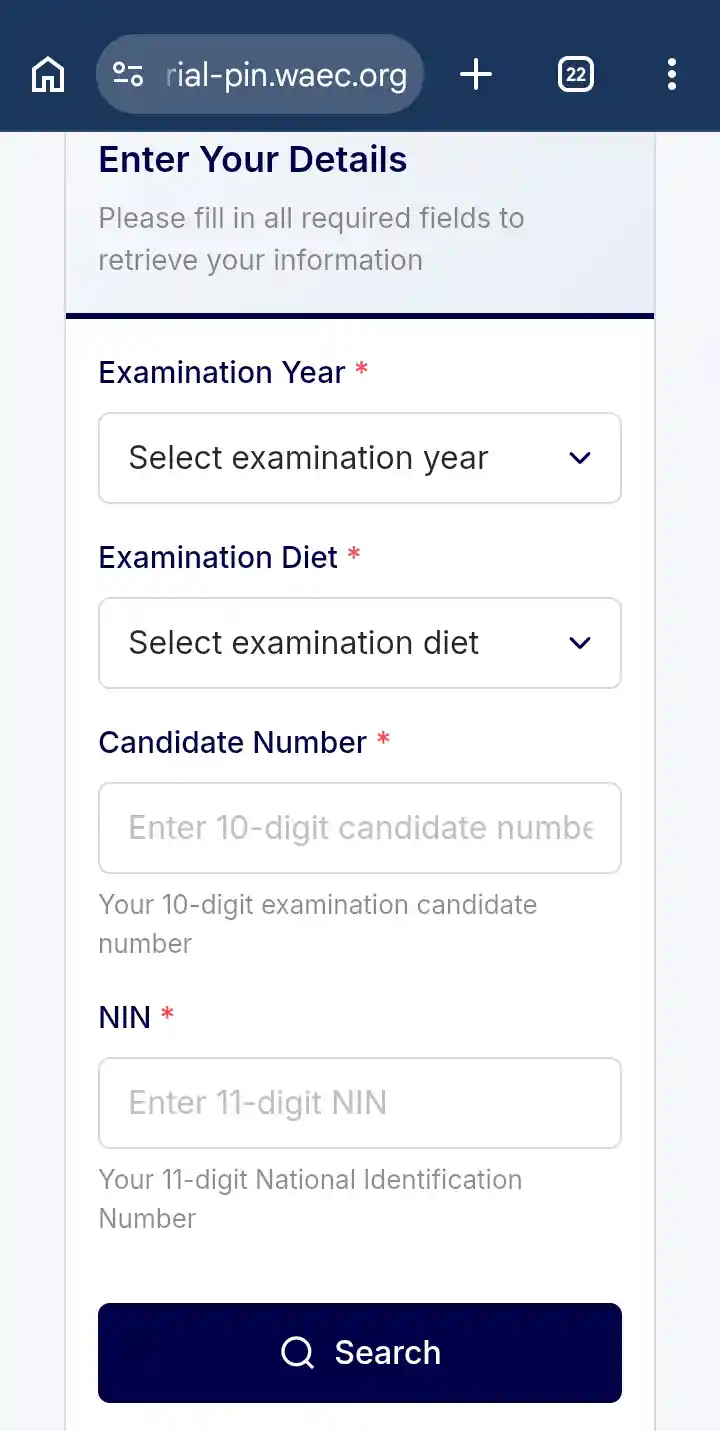
Open your web browser and navigate to https://serial-pin.waec.org/. This is the only official website for generating your Serial Number and PIN. Be very careful to type the URL correctly, as there are many fraudulent websites that mimic WAEC’s official pages. Look for the padlock symbol in your browser’s address bar, which indicates that the connection is secure. Once the page loads, you will see a form titled “Retrieve Your Examination Credentials.”
Step 2: Select Your Examination Year
On the form, you will see a dropdown menu labeled “Examination Year.” Click on it and select 2026 from the list of available years. Ensure you do not accidentally select a different year, as this will cause an error. Double-check that “2026” is clearly displayed before proceeding to the next field.
Step 3: Select Your Examination Diet
Next, you will see another dropdown menu labeled “Examination Diet.” Here, you must select the correct diet for your examination category. If you wrote the examination as a school candidate, select “WASSCE for School Candidates.” If you are a private candidate, select the appropriate option for your category. This step is critical because selecting the wrong diet will prevent the system from finding your records. Take a moment to confirm your selection before moving on.
Step 4: Enter Your 10-Digit Candidate Number
In the field labeled “Candidate Number,” carefully type your 10-digit candidate number. This number is unique to you and was assigned during your registration. Ensure you enter it exactly as it appears on your examination documents. Do not add any spaces, dashes, or extra characters. For example, if your candidate number is 1234567890, type it as 1234567890. A single typo will result in an error message, so double-check your entry before proceeding.
Step 5: Enter Your 11-Digit NIN
In the field labeled “NIN,” type your 11-digit National Identification Number. This is a mandatory requirement for the 2026 examination, and the system will cross-check your NIN against its database. Ensure you enter all 11 digits correctly. If you are unsure of your NIN, check your NIN slip or use the NIMC mobile app to retrieve it. Do not attempt to use a fake or incorrect NIN, as the system will reject it.
Step 6: Click the “Search” Button
Once you have filled in all the required fields, look for the “Search” button at the bottom of the form and click on it. The system will now process your request and cross-check your details with its database. This process usually takes only a few seconds, depending on your internet speed. Be patient and do not click the button multiple times, as this may cause the system to lag or return an error.
Step 7: Retrieve and Save Your Serial Number and PIN
After the system successfully verifies your details, your Serial Number and PIN will be displayed on the screen. These are your unique credentials for checking your results. Immediately write them down on a piece of paper or take a clear screenshot and store it safely in your phone or cloud storage. It is also advisable to print a physical copy for your records. Do not share these credentials with anyone, as they are personal and can be used to access your results. If you lose them, you will have to go through the entire process again, which can be inconvenient and time-consuming.
Step 8: Proceed to Check Your Results
With your Serial Number and PIN successfully generated, you are now ready to check your results. The next section of this guide will walk you through the final steps.
How to Check Your 2026 WAEC Results
Now that you have your Serial Number and PIN, the next step is to visit the main WAEC result checking portal and view your performance. Follow these steps carefully:
Step 1: Visit the WAEC Result Checking Portal
Open your web browser and go to www.waecdirect.org. This is the official WAEC result checking website. Be cautious of fake websites that may try to impersonate this portal. Always verify that you are on the correct page before entering any sensitive information.
Step 2: Enter Your Serial Number
On the WAEC Direct page, you will see several fields requiring your details. In the first field, enter the Serial Number you generated from the previous step. This is typically a 10-digit or alphanumeric code. Ensure you enter it exactly as it appears, without any spaces or errors.
Step 3: Enter Your PIN
In the next field, enter the PIN you generated. This is usually a 12-digit number. Again, be careful to type it correctly, as any mistake will prevent you from accessing your result.
Step 4: Select Examination Year
From the dropdown menu, select 2026 as the examination year. Ensure you do not select any other year, as this will return an error.
Step 5: Click “Submit” and View Your Result
Once all fields are correctly filled, click on the “Submit” button. Your result will be displayed on the screen within seconds. You can now view your grades and performance. It is highly recommended that you print a copy of your result or save it as a PDF for future reference. You may also need to print a physical copy for admissions or job applications.
Important Information About WAEC Result Release Date
According to the Head of WAEC Nigeria National Office, Dr. Amos Josiah Dangut, the 2026 WASSCE results will be officially released on August 3, 2026. This date has been confirmed through official channels and various news platforms. Candidates are advised to be patient and wait for this date before attempting to check their results. Any attempt to check before the official release date will return an error message indicating that results are not yet available. As reported by Ejes Gist News, WAEC has assured the public that all necessary processes, including marking, grading, and quality assurance, have been completed, and the results will be released on schedule.
Troubleshooting Common Issues in Generating Your WAEC PIN & Serial Number
While the process is straightforward, candidates may encounter some challenges. Here are common issues and how to resolve them:
Details Not Found” Error
If the system returns an error stating that your details were not found, double-check your Candidate Number and NIN for accuracy. Ensure you have selected the correct Examination Year (2026) and Diet. If the problem persists, contact your school’s examination officer or reach out to WAEC through their official support channels. Do not use third-party agents.
Forgot Your Candidate Number
If you have lost your candidate number, contact your school immediately. The examination officer should have a record of all candidate numbers for their students. Alternatively, check your registration slip or any SMS or email you received from WAEC during the registration process.
Forgot Your NIN
If you cannot remember your NIN, use the NIMC mobile app or visit any NIMC enrollment center to retrieve it. You can also check your NIN slip, which was issued during enrollment. Without your NIN, you will not be able to generate your Serial Number and PIN.
Page Not Loading
If the WAEC portal is not loading, it could be due to high traffic or a poor internet connection. Try accessing the page at a different time, preferably early in the morning or late at night when traffic is lower. Also, ensure your browser is up-to-date.
Suspicious Websites
Beware of fake WAEC portals that promise to generate your PIN for a fee. The official process is completely free. Only use https://serial-pin.waec.org/ and www.waecdirect.org. Do not share your details with anyone claiming to help you.
Tips for a Smooth Result Checking Experience
To ensure you have a hassle-free experience when checking your 2026 WAEC results, consider the following tips:
1. Prepare in Advance
Do not wait until the results are released before you start gathering your details. Have your Candidate Number and NIN ready now. The earlier you prepare, the easier it will be when the results are published.
2. Use a Reliable Internet Connection
A strong and stable internet connection is essential. Avoid using public Wi-Fi networks that may be slow or insecure. A 4G mobile network often works well.
3. Keep Your Credentials Safe
Your Serial Number and PIN are sensitive information. Do not share them with anyone, as they can be used to access your result without your consent. Store them securely and only use them when checking your result.
4. Print Your Result Immediately
Once you view your result, print a copy or save it as a PDF. This ensures you have a permanent record, even if the portal becomes unavailable later.
5. Verify Your Result
After checking your result, verify the details, including your name, subjects, and grades. If you notice any errors, contact WAEC immediately for correction.
Frequently Asked Questions (FAQs)
Q1: Is the Serial Number and PIN generation free?
Yes, the entire process is completely free. You do not need to pay anything to generate your Serial Number and PIN.
Q2: Can I use the old smart card?
No, the old smart card system has been phased out for the 2026 examination. You must generate your credentials online.
Q3: What if I don’t have a NIN?
Without a NIN, you cannot generate your Serial Number and PIN. This is a mandatory requirement for the 2026 examination.
Q4: When will the results be released?
The results will be released on August 3, 2026, according to WAEC’s official announcement.
Q5: Can I check my result using my phone?
Yes, the process works perfectly on mobile phones. The WAEC portals are mobile-friendly.
Stay Prepared and Stay Informed
The 2026 WAEC result checking process marks a new era in Nigeria’s educational system. The shift from physical smart cards to online generation of Serial Numbers and PINs is a welcome development that promotes transparency, reduces fraud, and makes the process more accessible to all candidates. However, this change also places a greater responsibility on students to ensure they have the correct information and follow the proper steps. By carefully following this comprehensive guide, you can generate your credentials for free and check your results without any stress.
Ejes Gist News reports that the introduction of this digital system is part of WAEC’s commitment to modernizing its operations and aligning with global best practices. Candidates are encouraged to embrace this change and share this guide with their friends and classmates who may be unsure about the new process. Remember, the results will be available from August 3, 2026, so do not wait until the last minute. Gather your details, follow the steps outlined in this guide, and you will have no trouble accessing your results.
Congratulations on completing your 2026 WASSCE. We wish you the very best in your results and future endeavors. May your hard work pay off, and may your results open doors to the opportunities you deserve.
Thanks for using our platform to learn how to generate your WAEC PIN & Serial Number
Stay safe, stay informed, and always verify information from official sources.
You May Also Like


Trending Now