

NYSC Green Card and Call-Up Letter: Printing and Checking Guide
NYSC Green Card and Call-Up Letter: printing and checking guide
What the NYSC Green Card means: this guide explains how to print the card and check the call-up letter.
The Green Card is the slip that a prospective corps member prints after completing registration on the National Youth Service Corps official website.
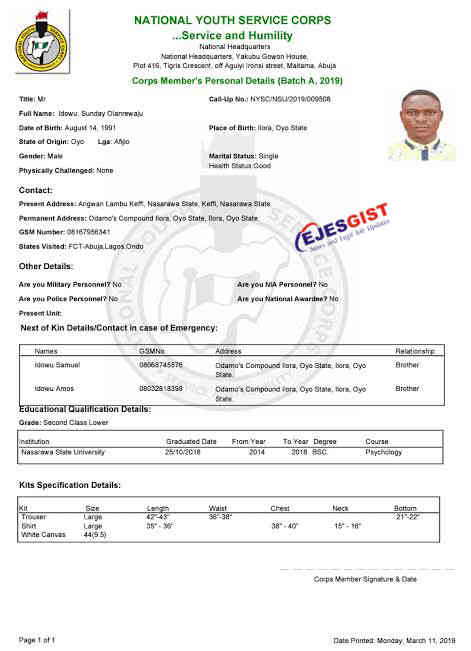
The NYSC Green Card is an online registration print-out that shows a prospective corps member’s (PMC) personal information and the kit sizes selected, including shoe and shirt sizes.
Ejes Gist News explains the meaning of the card, how to print it and what a sample looks like.
The NYSC Green Card and the NYSC Call-Up Letter are two key documents for graduates preparing for service. This guide explains how to obtain the Green Card and how to check and print the Call-Up Letter.
Steps for obtaining the NYSC Green Card
The NYSC Green Card, also called the NYSC Identity Card, is an important document for the service year. It functions as formal identification and is needed for many tasks and dealings over the service year. To obtain it:
- Finish your NYSC registration: Make sure you have registered successfully on the NYSC portal and supplied accurate information.
- Await the ID card notification: After registration and verification, you will get a notice that your Green Card is ready to print.
- Open the NYSC portal: Use your login details to sign in to your dashboard on the official NYSC portal.
- Find the Print Green Card section: On the dashboard, locate the Print Green Card or NYSC Identity Card option and click it.
- Generate and print the card: Follow the prompts to create and print your Green Card. You will need a printer and enough paper.
NYSC Green Card sample for 2024 and later
Key reminder
One required document for the orientation camp is the NYSC Green Card. After printing it, take it to camp along with your other papers.
The online enrolment process on the National Youth Service Corps website remains incomplete unless the Green Card slip is printed.
Although it is called a Green Card, the document issued by the National Youth Service Corps is not actually green; the word ‘Green’ is used to signal its importance.
Checking WAEC results for 2024/2025 by SMS, phone or scratch card
A new guide to calculating the NYSC age limit for 2024/2025 mobilisation
Details shown on the NYSC Green Card
The Green Card carries the following information:
- The NYSC logo and the heading of the NYSC letter, including the head office address; the batch and service year
- Call-up number: a unique identification number issued by NYSC to each prospective corps member.
- Personal data: name, date of birth, state of origin and similar details.
- Contact information: where you live, your phone number and the state you have visited.
- Next of kin details: name, telephone number and address.
- Education: the grade earned, school attended, year of graduation and course studied.
- Kit sizes: the measurements chosen for NYSC kit items during online registration.
Printing the Green Card: step by step
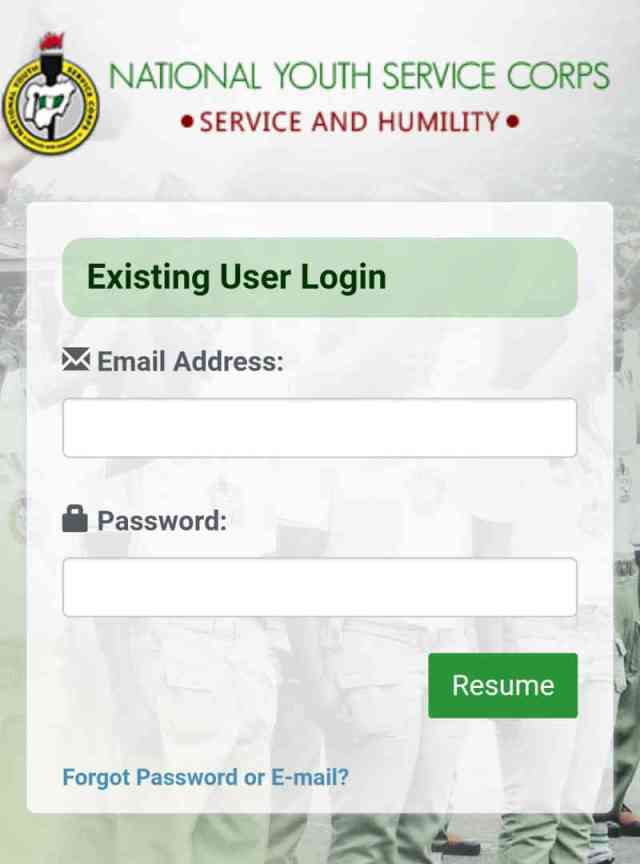
- Open the NYSC website at portal.nysc.org.ng.
- Click the login button after entering your registered email address and password.
- Click Resume to enter your dashboard.
- Locate the Print Slip option and click it.
Clicking Print Slip opens a new screen where the Green Card preview appears, as illustrated below.
Printing the Green Card preview
5. At the upper right of the preview, two icons are available: one starts printing, the other downloads the card.
6. Use arrow 1 for printing and arrow 2 if a download is needed.
Note: Printing can be repeated as many times as necessary; at the orientation camp, however, only two copies are required, namely the original and a photocopy.
Reprinting the NYSC Green Card
A lost Green Card, or a request for an extra copy, can be handled by reprinting. Return to the same steps and open the Print Green Card option on the NYSC dashboard; a fresh copy can be produced whenever it is needed.
Checking and printing the NYSC Call-Up Letter
The Call-Up Letter formally invites a prospective corps member to the orientation camp and explains where the person has been deployed and the camp assignment. To check and print it:
- Sign in to the NYSC portal: Go to the official NYSC portal, then sign in to your dashboard with the email address and password used during registration.
- Select the Print Call-Up Letter option: The dashboard provides a Print Call-Up Letter option; click it to continue.
- Generate and print the letter: Complete the prompts to generate the letter and send it to a printer; make sure a printer and adequate paper are available.
- Checking NECO results for 2024/2025 on the official result portal
- Nigerian senators’ salaries and allowances for 2024/2025: a look at the new package
What to do after printing the Green Card
- Sign the card: Sign the card with ink in the designated space at the bottom right, then add the date next to the signature.
- Make copies: Produce about four copies of the signed card.
- Keep it safe: The Green Card must be submitted at the National Youth Service Corps orientation camp, so store it securely.
- Wait for the Call-Up Letter: The National Youth Service Corps will send the Call-Up Letter a few days after the Green Card is printed.
Green Card versus Call-Up Letter: the difference
Personal details on the Green Card include the holder’s name, age, address, next of kin, date of birth and marital status; the Call-Up Letter has a separate role.
The NYSC sends the Call-Up Letter to prospective corps members as an official notice. It tells each recipient where they have been posted and deployed, the location of the orientation camp they must attend, the date to report and other instructions. Once registration and verification are done, the letter is usually retrieved online by logging into the NYSC portal. It should be taken to the orientation camp, where it serves as both an invitation and an entry pass.
Keeping the Green Card and Call-Up Letter safe
Both the Green Card and the Call-Up Letter should be kept safe and within reach during the NYSC process. With the steps above, prospective corps members can print the Green Card and check or print the Call-Up Letter as required.
Ejes Gist News stands for truth, responsible journalism, editorial integrity and fearless accountability.
You May Also Like
Trending Now




Pls i can’t print my call up letter on phone ,pls put me through how to print it
Click download and it will be save on your phone… Go to file manage and check download you will see the file there…
Visit any business centre and print it.